Three copies of data form the core of the 3-2-1 backup rule, spread across two types of storage media with at least one copy kept off-site. The three copies are the original production data plus two backups, and the remote copy guards against fire, flood, or theft at the primary location. Implementation steps run from identifying data through testing restores and securing the copies. The questions section helps choose a vendor, and the variants include 3-2-1-1-0 and 4-3-2.
- 3 copies of your data: The three copies are your original (production) data plus two backups. Creating regular, planned backups is essential. Set the backup frequency according to how often the data changes and your recovery requirements. For example, if your data changes constantly, you may need daily or even hourly backups. If it rarely changes, weekly backups may be enough.
- 2 different storage media types: Store the copies on two different types of media, such as a hard drive and the cloud, to protect against device failure or software errors. Using several media types shields the data from problems specific to any one type. If one medium fails or is damaged, the copies on the other media can still be used for recovery. For example, a hard drive may fail, but if you have a copy in the cloud or on an external drive, you can still access and restore the data.
- 1 copy off-site: Keep at least one backup away from the primary location, for example in the cloud or at a remote site, to protect the data from on-site incidents such as fire, flood, or theft. Off-site storage can be done in several ways. A common option is a cloud storage service, where your data lives on remote servers that typically offer strong protection and automatic replication. Other options include external drives kept at another location, such as a branch office, a warehouse, or your home.
Implementation Steps
- Identify the data to back up: First determine which data needs to be backed up. This includes important data such as documents, photos, videos, and work files. This assessment helps you plan an appropriate backup.
- Plan the backup: Plan how and how often to back up the data. Decide how to create the backups, such as full or incremental backups, and choose suitable backup tools or software.
- Choose storage media: Select different types of media for the copies. For example, combine hard drives, optical discs, and cloud storage to satisfy the media-diversity requirement.
- Set up off-site backup: Make sure at least one backup is stored at a different location. You can use a cloud storage service, rent storage space in a remote data center, or keep a spare drive at a distant location.
- Test and evaluate: Periodically check the backups to make sure they can be restored when needed. This includes running restore tests to confirm the integrity and accessibility of the backups.
- Ensure security: Protect the copies with appropriate security measures, such as encryption and access control, to defend the data against external and internal threats.
Questions to Ask
1. What do you need to back up?
Common backup targets include endpoint devices (desktops, laptops), servers (file servers, NAS, virtual machines), and SaaS applications (Microsoft 365, Google Drive). Your preferred vendor must support all or most of the data sources you need to back up.
2. What is your budget?
If you are a small business whose main goal is simply backing up and restoring data, choose a simple, cost-effective solution. If you are part of a large organization with more than 1,000 employees, list all your requirements and choose a solution that meets them, such as backing up and protecting data across multi-cloud environments, data centers, and the edge.
3. Which compliance regulations must you follow?
Healthcare companies must comply with HIPAA when handling patient records, and financial services companies must follow the rules of the SEC, CFTC, FINRA, and the exchanges. Make sure your backup provider complies with the key regulations and legal frameworks.
4. How often do you want to back up your data?
Frequent backups require more storage space and high network bandwidth. With on-premises storage you must also account for hardware costs, maintenance and upkeep, extra staff to manage the storage system, and more. A fully SaaS-based solution with no hardware is usually priced by usage. A 100% SaaS solution can cut your total cost of ownership by up to 50%.
5. Is the solution easy to use?
Ease of use ensures that people in the organization can back up and restore their data when needed without IT support. This frees the IT team to handle more important tasks such as remotely wiping lost devices or inspecting backup data for malware.
Backup Strategies
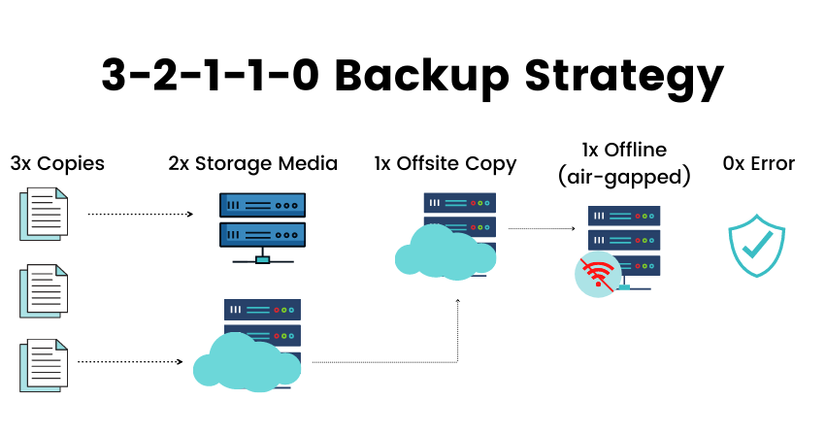
1. Backup 3-2-1-1-0 strategy
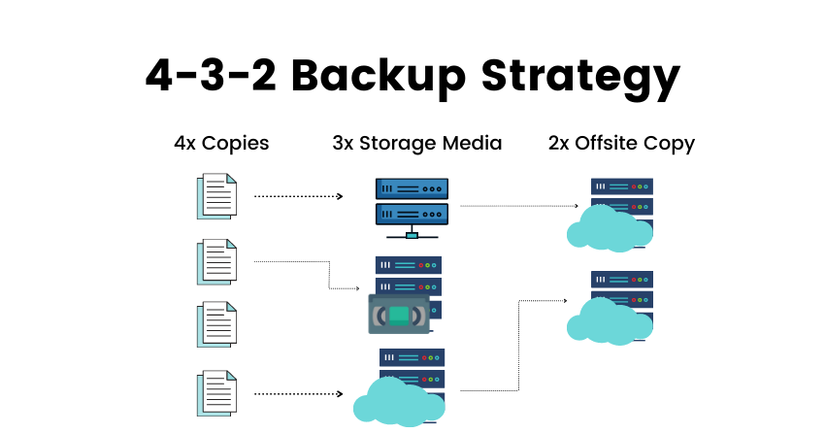
2. Backup 4-3-2 strategy
See also: Kafka DLQ And Retry · File Compression