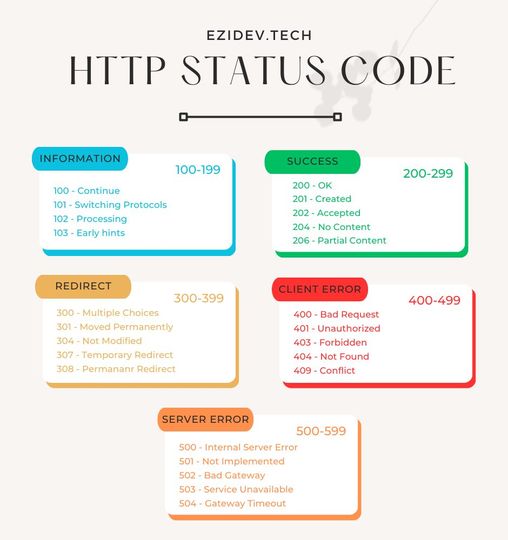
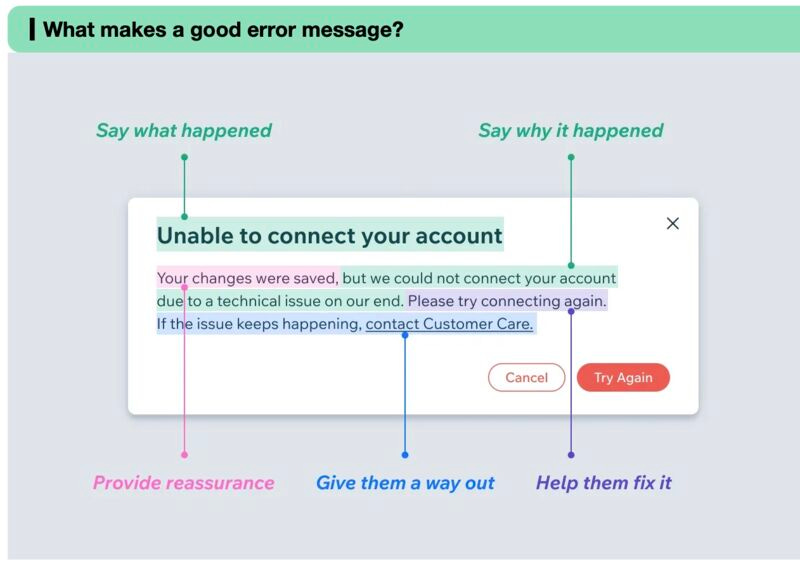
This note gathers two things about HTTP in one place. The first is a small reading list on HTTPS and SSL/TLS, RFC 7807 problem details for HTTP APIs, and how HTTP moved from version 1 to 2 and 3. Two diagrams sit below the links. The second is a reference to the common HTTP methods: GET, POST, PUT, DELETE, PATCH, HEAD, CONNECT, OPTIONS, and TRACE. Each method gets its purpose, whether it is idempotent, and everyday examples such as fetching a page, creating a post, or deleting an account. Read the links for the concepts, then use the method section as a quick lookup when you design or review an API.
Resources
- https://viblo.asia/p/https-la-gi-giai-thich-chi-tiet-ssltls-bang-chuyen-tinh-cho-va-meo-2oKLn2Q1LQO (What is HTTPS? A detailed SSL/TLS explanation)
- An introduction to RFC 7807 | Representing Problem Details in HTTP APIs (axway.com): https://blog.axway.com/learning-center/apis/api-design/introduction-to-rfc-7807
- "Mít Đặc và Biết Tuốt" on network speed and the evolution of HTTP from HTTP/1 to HTTP/2 and HTTP/3: https://viblo.asia/p/mit-dac-va-biet-tuot-noi-ve-toc-do-mang-va-su-tien-hoa-cua-http-tu-http1-http2-http3-5pPLk9Gn4RZ
Common HTTP Methods
A quick concept first:
- Idempotent: a method is idempotent when performing it n + 1 times still leaves the result the same as after the first call.
1. GET (Retrieve)
- Purpose: Fetch information from a resource on the server.
- Characteristic (idempotent): Repeating the same GET request returns the same result. Examples: visiting a web page, downloading an image, listing products.
2. POST (Submit)
- Purpose: Send data to the server to create or update a resource.
- Characteristic (non-idempotent): Repeating the same POST request may create or update the resource multiple times. Examples: registering an account, creating a post, submitting an order.
3. PUT (Update)
- Purpose: Update the content of an existing resource on the server.
- Characteristic (idempotent): Repeating the same PUT request updates the resource with the same content each time. Examples: updating profile information, editing a post, changing the quantity of an item in a cart.
4. DELETE (Remove)
- Purpose: Remove a resource from the server.
- Characteristic (idempotent): Repeating the same DELETE request removes the resource only once. Examples: deleting a post, cancelling an order, deleting an account.
5. PATCH (Partial Update)
- Purpose: Update part of the content of a resource on the server.
- Characteristic (non-idempotent): Repeating the same PATCH request may update the resource multiple times. Examples: updating an email address, changing a password, updating an order status.
6. HEAD (Retrieve Headers)
- Purpose: Fetch the header information of a resource on the server, including its type, size, last-modified time, and so on.
- Characteristic (no response body): Unlike GET, HEAD returns only the headers, saving bandwidth and load time. Examples: checking whether a resource exists, reading
lastModifiedto determine whether a resource has been updated.
7. CONNECT (Tunnel)
- Purpose: Establish an encrypted TCP tunnel between client and server.
- Characteristics:
- Used for protocols that do not support HTTPS natively: for example SSH and FTP.
- Secures the transfer of sensitive data: helps protect data from being stolen or altered in transit.
8. OPTIONS (Query Options)
- Purpose: Get information about the HTTP methods a resource on the server supports.
- Characteristics:
- Helps determine which actions can be performed on a resource: for example GET, POST, PUT, DELETE, and so on.
- Useful for applications that interact with web APIs: lets them know how to call the API correctly.
9. TRACE (Trace)
- Purpose: Trace the path of an HTTP request from client to server and back.
- Characteristics:
- Helps debug network and server connectivity problems: by following each hop of the request, you can locate the point of failure.
- Rarely used in practice: because of its complexity and few practical applications.
See also: NAT And Port · Reverse Proxy